Documents, spreadsheets, slides and PDFs, on one shared core.
OFFICE APPS · IN DEVELOPMENT · WINDOWS AND FUSION OS · FUSION WRITE ON ANDROIDFusion Office is four apps: Fusion Write, Fusion Spreadsheets, Fusion Slides and Fusion PDF Viewer. They are written in C++ on one shared core, open and save Word, Excel, PowerPoint and PDF files, and run on Windows and Fusion OS. Fusion Write also runs on Android phones and tablets. They are in development, and nothing has been released yet.
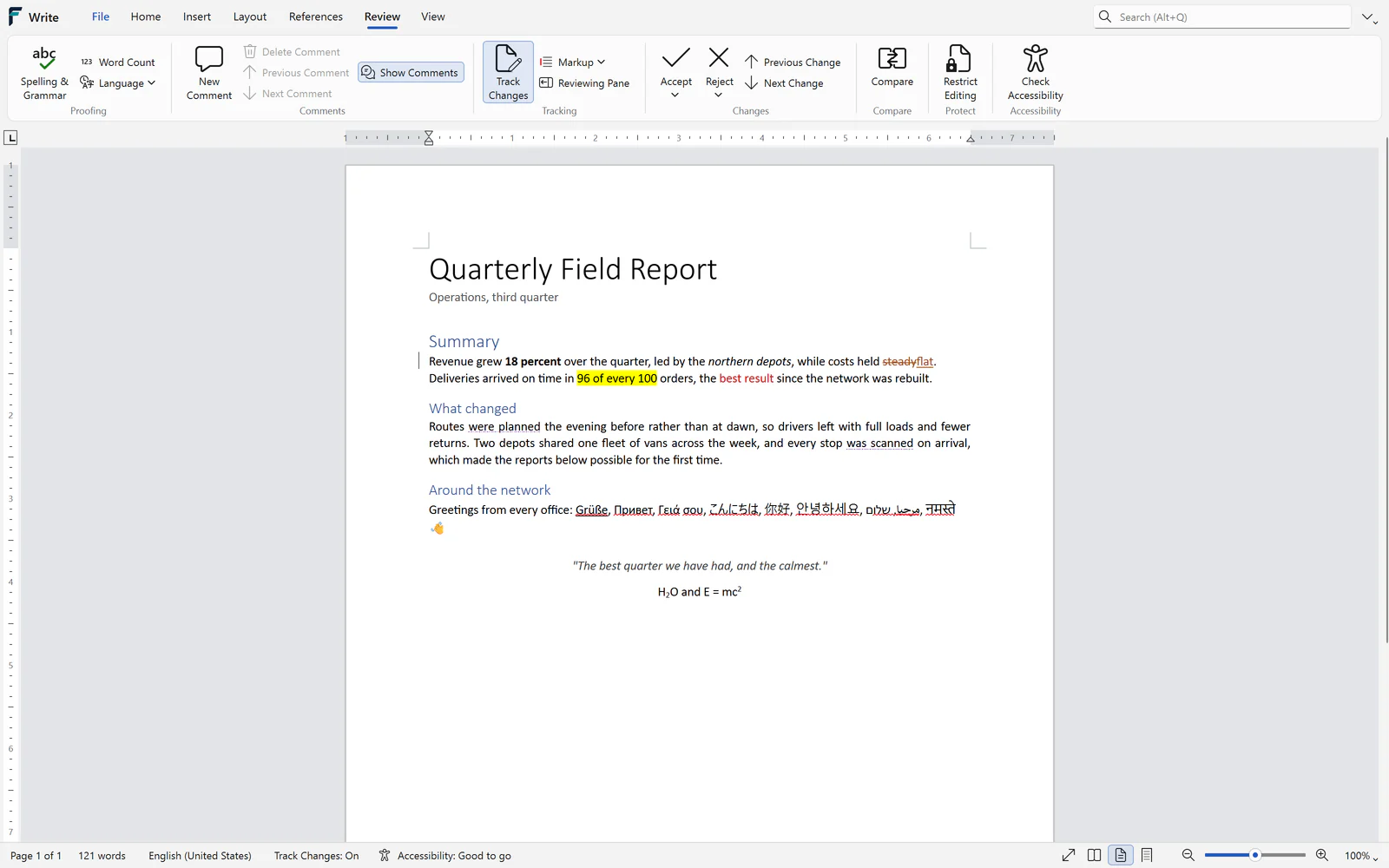
Fusion Write's development build on Windows: a tracked change on a report, with the Review tab open.
Four apps, one core.
The four apps share one C++ core for documents, text, drawing and files. Every screenshot on this page is a real window of a development build on Windows, in the light theme.
Fusion Write
Word processing, with Track Changes, comments, references, tables and Fusion's own English grammar checker.Fusion Write →
Fusion Spreadsheets
Workbooks with 154 Excel functions, conditional formatting, filters, sorting and charts.Fusion Spreadsheets →
Fusion Slides
Presentations with shapes, tables, charts, transitions, animations and a presenter view.Fusion Slides →
Fusion PDF Viewer
Read, search, comment on, fill, reorder and redact PDFs, on Fusion's own PDF engine.Fusion PDF Viewer →
Fusion Write
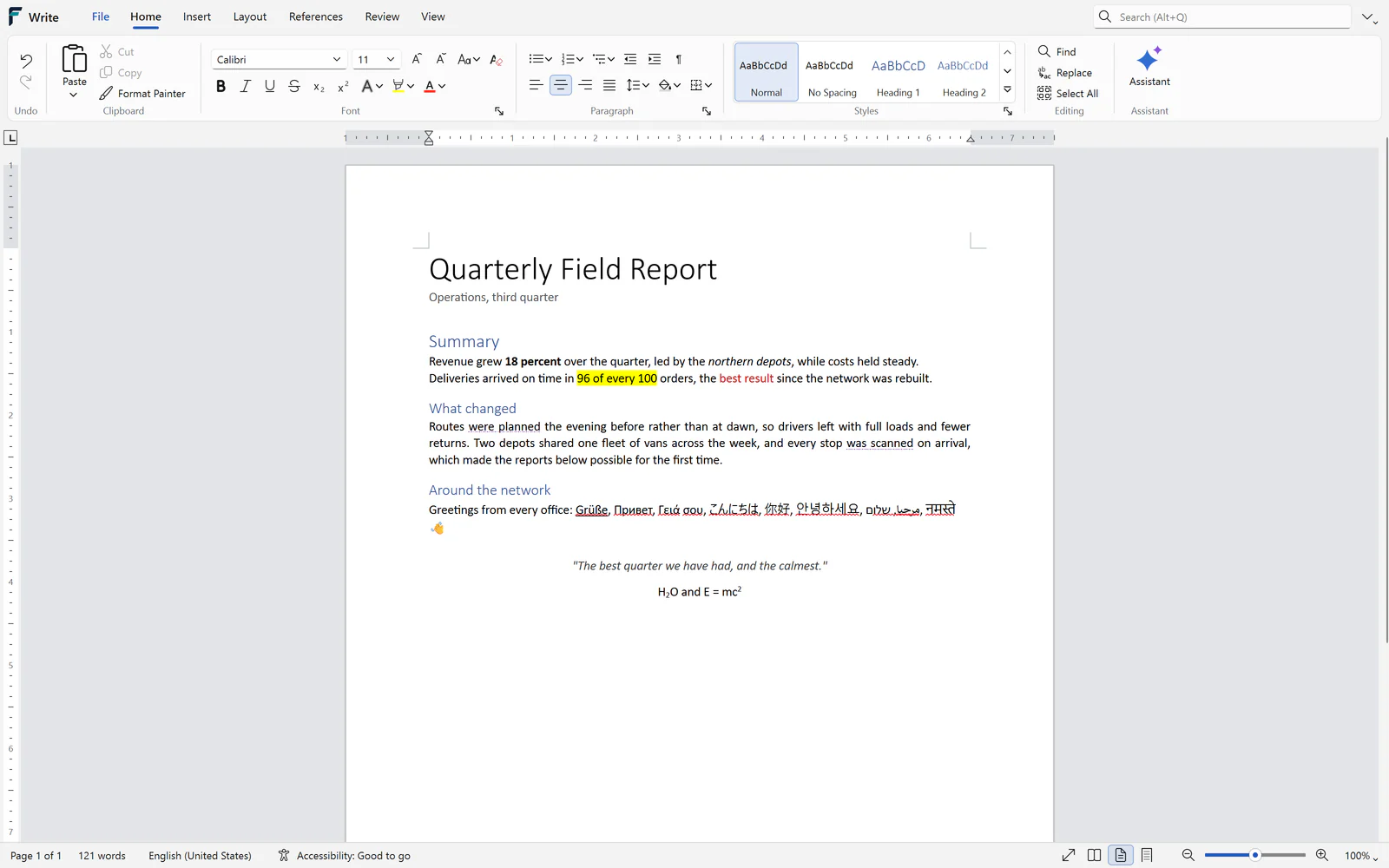
WORD PROCESSOR · IN DEVELOPMENTWrite, review and lay out documents that Word can open. Everything listed here works in the desktop development builds; Android has less (see Platforms).The Home tab. One line of the page mixes nine scripts, laid out by Fusion Office's own core.
Track Changes and Compare
Insertions, deletions, formatting changes, table rows and links are recorded as Word records them. Accept or reject them one by one or all at once, in four markup views, with a Reviewing Pane. Compare turns the differences between two documents into tracked changes.
Comments and Restrict Editing
Comment threads with replies, resolve and reopen, saved as Word 365 saves them. Restrict Editing can limit a document to reading, comments or tracked changes, with an optional password that Word also accepts. The file itself is not encrypted.
References
An automatic table of contents, footnotes and endnotes, citations and a bibliography in APA, Chicago or MLA, captions with a table of figures, and an index from marked entries.
Tables
Word's 105 built-in table styles, borders drawn by pen style, weight and colour, AutoFit, repeating header rows, sorting on up to three keys, Convert Text to Table, Split Table and formulas such as =SUM(ABOVE).
Equations, charts and pictures
Equations typed in Word's linear format with Alt+=. Charts in eight types, saved with a workbook that Excel can edit. Pictures, shapes and text boxes with text wrapping, position, rotation and drag handles.
Page layout, styles and lists
Section breaks, different first-page and odd and even headers and footers, page numbers and balanced columns. A styles gallery and pane, multilevel lists you define, and indents and tab stops dragged on the ruler.
Spelling and grammar
Spelling uses Windows' own checker in each language the system has, and Hunspell on Fusion OS. Grammar comes from Fusion's own English checker in the Editor pane (F7): their and there, its and it's, subject-verb agreement, passive voice and wordy phrases.
Text and reading
Change Case, small caps, character spacing and scale, and outline, shadow and glow effects. AutoCorrect as you type. Read Mode, Focus, a Pageless view and Dark Page.
PDF, printing and paste
PDF export with embedded fonts and searchable text, and printing on Windows. Pasting from a browser or from Word keeps headings, lists, links, tables and pictures, with Keep Source, Merge and Text Only.
Not built yet
Mail merge, envelopes and labels; the Design tab (themes, watermarks, page borders); picture cropping and picture styles; inserting fields such as the date, and cross-references; Outline view; Word 97-2003 .doc files, macro-enabled .docm files and password-encrypted documents. Grammar checking is in English only. Documents are written to Word's published format, but not every feature has been checked by opening the file in Word itself.
Fusion Spreadsheets
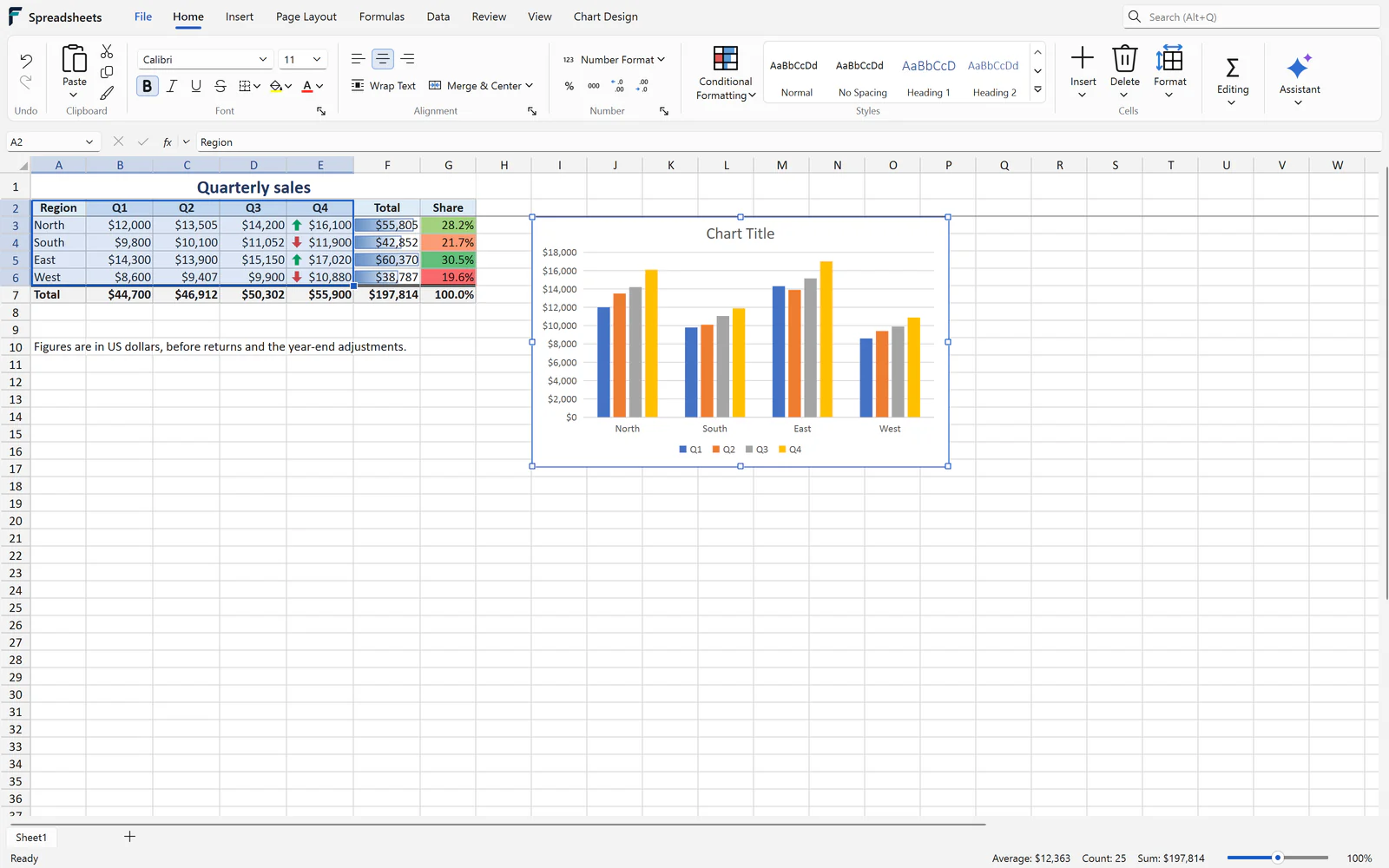
SPREADSHEETS · IN DEVELOPMENTWork with Excel workbooks: formulas, formatting, filters, charts and printing. Everything listed here works in the desktop development builds; Android has less (see Platforms).Data bars, a colour scale and icon sets on one table, with a column chart beside it.
154 Excel functions
XLOOKUP, VLOOKUP, INDEX, SUMIFS, IFS, TEXTJOIN, NETWORKDAYS, OFFSET, INDIRECT, SUBTOTAL and financial functions such as PMT, NPV, IRR and XIRR. Insert Function searches them all, and each argument is explained as you type. Named ranges have a Name Manager.
Conditional formatting
Highlight and top and bottom rules, data bars, two- and three-colour scales and all 20 icon sets. New Rule covers all six rule types, and Manage Rules has Stop If True.
Filter and sort
Number, text and date filters, including periods counted from today, filters by colour or icon, and dates grouped by year, month and day. Sort on up to 64 levels by value, cell colour, font colour or icon, with custom lists.
Charts
Column, bar, line, area, pie, doughnut, scatter and radar charts. Change the type, legend, data labels, titles, axis titles and number format, colours and style. They are saved as Excel chart parts.
Formatting and editing
Format Cells with 17 fill patterns, rotated text and shrink to fit; 49 built-in cell styles and your own. Paste Special with values, formats, transpose and arithmetic, Format Painter, Freeze Panes, AutoFill, and Find and Replace across the workbook.
Printing, comments and safe saving
Print areas and titles, page breaks, fit to pages, headers and footers, and PDF export. Threaded comments and notes are kept as Excel keeps them. Before saving, a warning names the Excel content it finds that would be lost, such as tables, pivot tables, macros and data validation; it doesn't catch everything yet. AutoRecover keeps a copy as you work.
Not built yet
Pivot tables, Excel tables and data validation; dynamic array functions such as FILTER, SORT, UNIQUE and LET; spelling; formula auditing; combo charts, trendlines and sparklines; sheet and workbook protection; .xls and .ods files. Macros in .xlsm files are not kept, and cells can't yet be read by a screen reader. Workbooks are written to Excel's published format, but not every feature has been checked by opening the file in Excel itself.
Fusion Slides
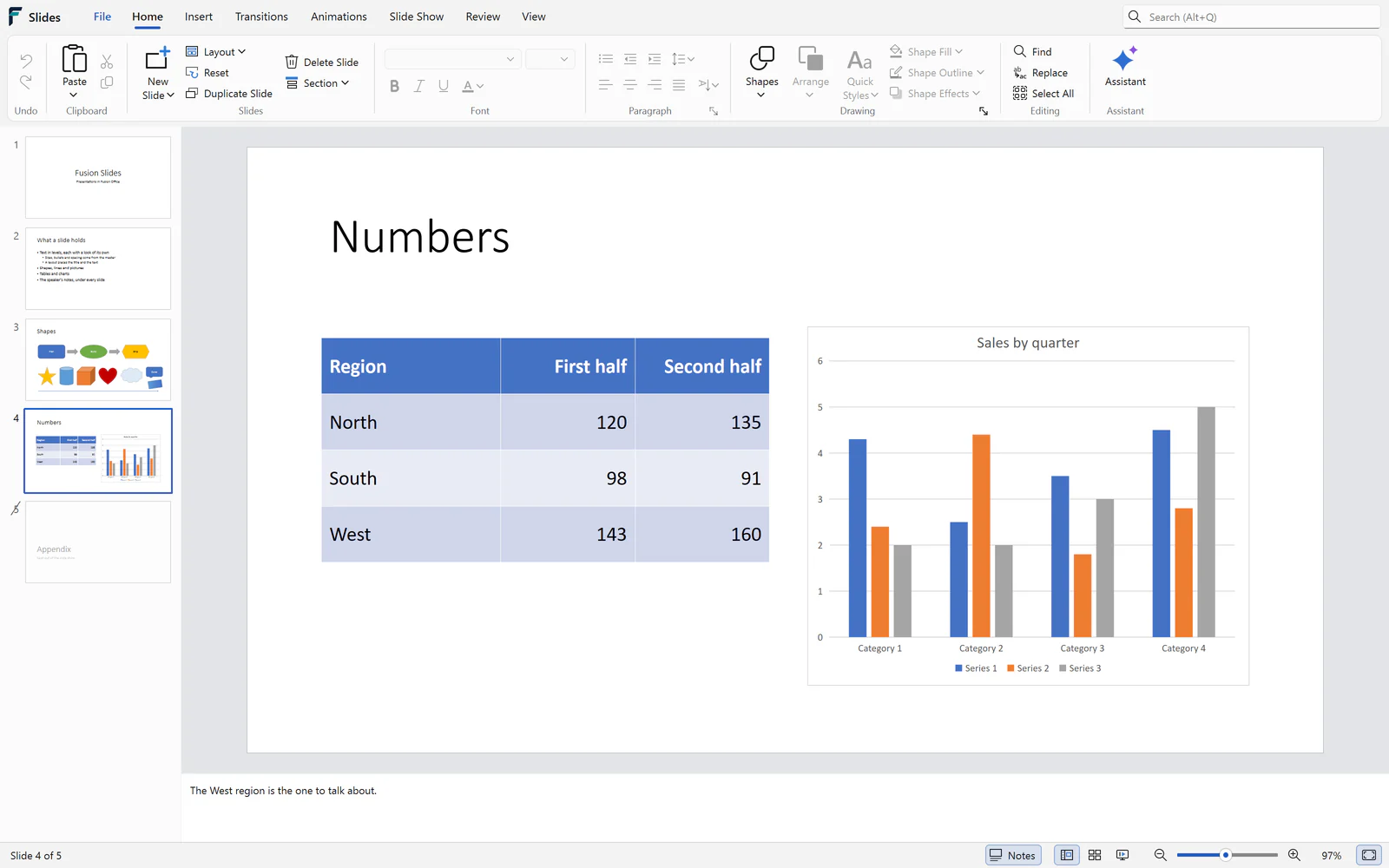
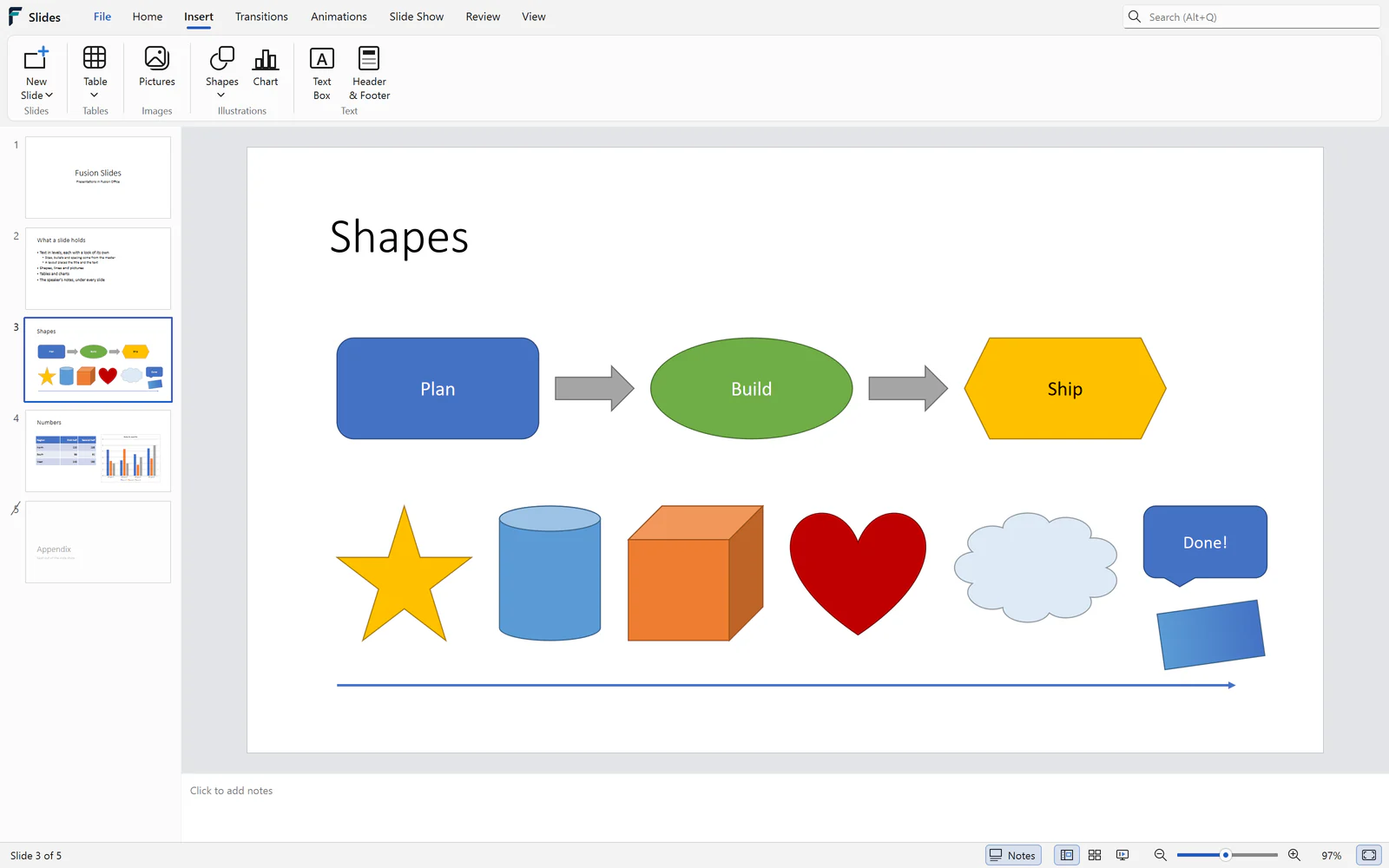
PRESENTATIONS · IN DEVELOPMENTBuild PowerPoint presentations and present them. Everything listed here works in the desktop development builds; Android has less (see Platforms).A slide with a table and a chart, its speaker notes below and a hidden slide in the strip.
Shapes
Preset shapes, a callout and a gradient fill, from the Insert tab.
Presenter View
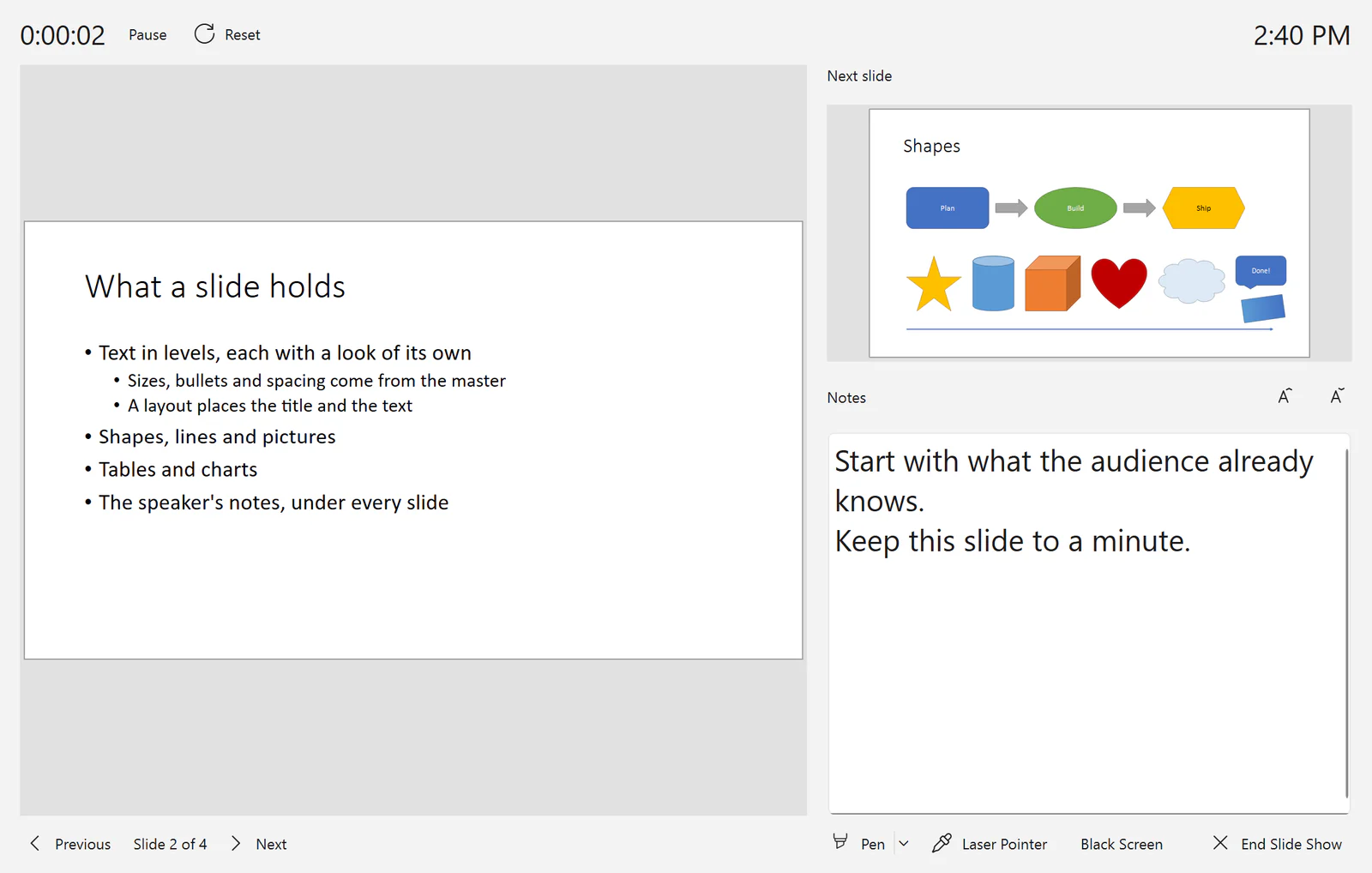
The current and next slide, notes, a timer, and the pen and laser pointer.
Slides and sections
New slides by layout, duplicate, hide and move them, reset a layout, and arrange slides in the Slide Sorter and in sections you can rename and collapse. Find and Replace runs through slides and notes, and spelling is checked as you type.
Shapes and formatting
PowerPoint's shape gallery with 92 preset shapes, smart guides, adjust handles, grouping and connectors that stay attached. Fill with a solid colour, a gradient, 48 patterns or a picture, and add lines, arrows, shadows and glows.
Tables and charts
PowerPoint's 74 built-in table styles, with insert, delete, merge, split and cell margins. Charts use Fusion Write's chart dialog. The Selection Pane (Alt+F10) shows, hides, renames and reorders what is on a slide.
Transitions and animations
Ten transitions, among them Fade, Push, Wipe and Zoom, with effect options, duration and advance by click or by time. A file's own animations play in the show, and the Animations tab adds 37 entrance, emphasis, exit and motion-path effects.
Presenting
Presenter View with the next slide, notes and a timer. Pen, highlighter, eraser and laser pointer, with ink kept as shapes, a black or white screen, Rehearse Timings, kiosk and looping shows, and custom shows from a file.
Printing, PDF and the PowerPoint file
Print slides, notes pages, an outline or handouts with up to nine slides a page, or export them as a PDF with searchable text. Slides copy between presentations with PowerPoint's paste choices. Parts of a PowerPoint file you didn't change are written back exactly as they were.
Not built yet
The Design tab and themes; editing slide masters (masters and layouts from a file are used, but can't be changed); playing video and audio; SmartArt, which shows as a labelled box; comments, links and Morph; numbered lists; export to video. Decks have not yet been checked by opening them in PowerPoint itself.
Fusion PDF Viewer
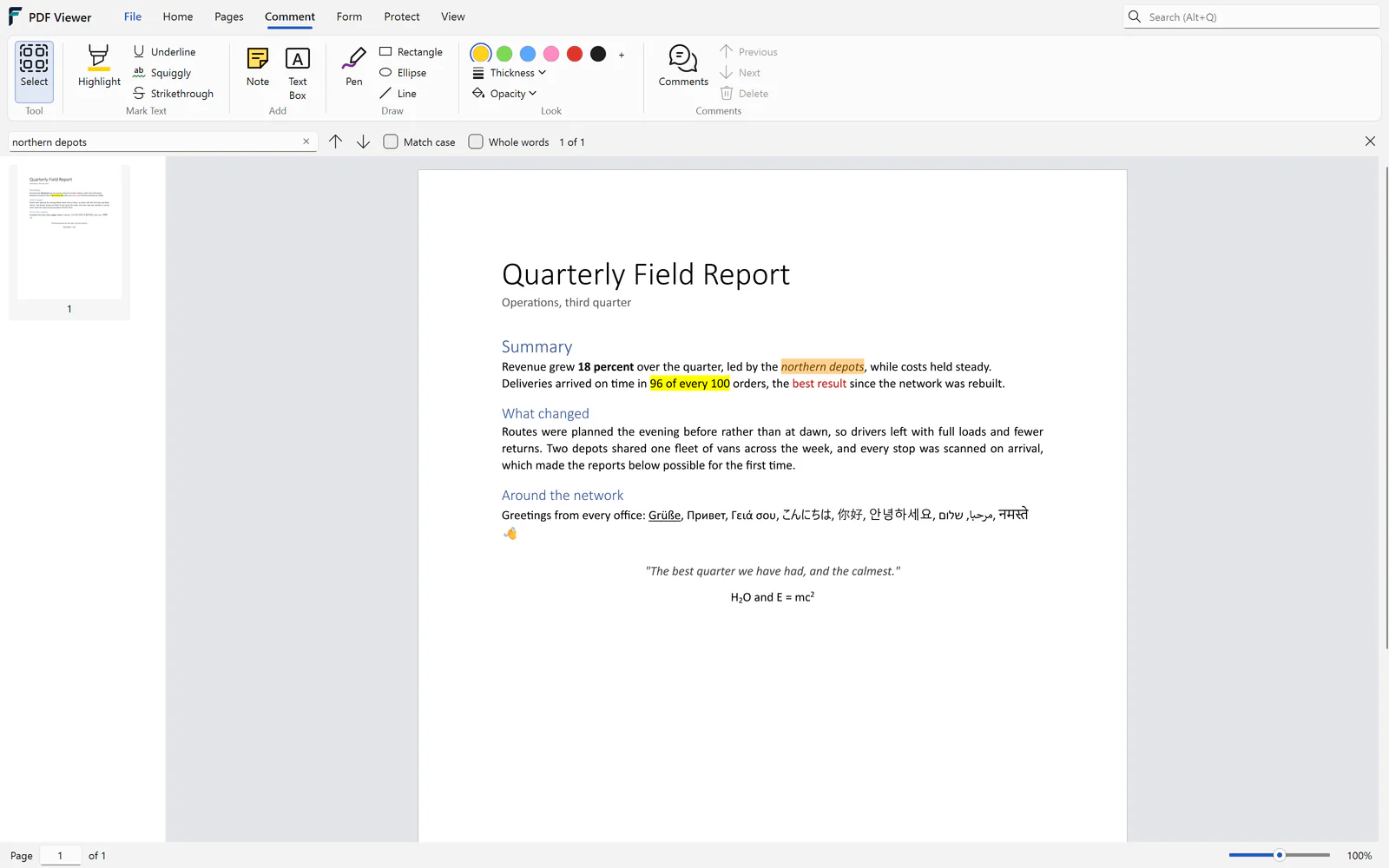
PDF · IN DEVELOPMENTRead and work on PDFs. Everything runs on Fusion's own PDF engine, with no other PDF code, in the desktop development builds.The Comment tab, with a search match marked on a PDF exported from Fusion Write.
Reading and finding
Pages are drawn on a background thread, so heavy pages don't freeze the window. Fit Width, Fit Page, two pages and cover views, thumbnails and bookmarks, Previous and Next View, Find with match case and whole words, and text selection across pages.
Organize Pages
Rotate, delete and move pages, drag several at once to reorder them, extract pages, and insert another PDF's pages after the current one, with undo and redo.
Fill forms
Fields are shaded and required fields outlined. Check boxes, radio buttons, text fields and lists work, Tab moves from field to field, and Flatten Form makes the answers part of the page.
Comments
Highlight, underline, squiggly and strikethrough; sticky notes and text boxes; pen, rectangle, ellipse and line. Move, resize and restyle them, and find them in a Comments pane with filters.
Redaction
Mark what has to go, preview it, then apply. The text, picture pixels and annotations under each mark are removed from the file, not just covered.
Export, print and links
Export the text, or each page as a PNG or JPEG picture at 150 dpi. Print, and view the document's properties. Links to pages, web addresses and email addresses are followed; links to files and scripts are not opened.
Not built yet
Opening password-protected PDFs; signing of any kind; editing the text or pictures on a page; combining several files into one PDF; text recognition (OCR) for scans; export to Word, Excel or PowerPoint; stamps, watermarks and page cropping. There is no Android app.
Works with the files you have.
Fusion Office opens and saves Word, Excel and PowerPoint files and PDFs. New documents are saved in Fusion Office's own formats unless you choose another.
Fusion Write
Opens .fdocument, .docx, .dotx (as a new document), .odt, .rtf and .txt. Saves .fdocument, .docx, .odt, .rtf and .txt, and exports PDF. A file you open is saved back in its own format.
Fusion Spreadsheets
Opens .fspreadsheet, .xlsx, .csv, and tab-delimited .txt and .tsv. Saves .fspreadsheet, .xlsx, .csv and .txt, and exports PDF. An .xlsm workbook opens, but its macros are not kept.
Fusion Slides
Opens .fpresentation and .pptx, and reads .ppsx and .potx as presentations. Saves .fpresentation and .pptx, and exports PDF as slides, notes pages, handouts or an outline.
Fusion PDF Viewer
Opens and saves .pdf. Exports text as .txt, pages as .png or .jpg pictures, and extracted pages as a new .pdf.
Fusion's own formats: .fdocument, .fspreadsheet and .fpresentation
They are the default for new documents, workbooks and presentations in Fusion Write, Fusion Spreadsheets and Fusion Slides. Word, Excel and PowerPoint formats stay one Save As away.
Built on Fusion's own engines.
Fusion Office writes its own PDF, barcode and text recognition engines in portable C++, and uses a few open-source components under licences that never require publishing Fusion's code.
PDF engine
IN USE IN FUSION PDF VIEWERReads and repairs PDF files, edits and saves pages, finds text, and draws pages with its own rasterizer, font readers and JPEG decoder, with the same pixels on Windows and Linux. It also fills forms, edits annotations and removes redacted content. On a test set of 396 PDFs it matched 97.7% of a reference tool's words. Decryption, signatures, JBIG2, JPEG 2000 and PDF/A are not done yet.
Barcode engine
NOT IN AN APP YETMakes and reads QR Code, Data Matrix, Code 128, Code 39, EAN-13, EAN-8, UPC-A and UPC-E, from clean images so far, with no outside code. The PDF engine uses it to stamp barcodes on pages. No app shows it yet.
Text recognition (OCR)
NOT IN AN APP YETStraightens a page, finds its lines and words in reading order, and reads each line with a neural network running on Fusion's own code. Its first model, for English, is trained by Fusion. It has been tried only on rendered test pages, not on real scans, and no app uses it yet.
Text and grammar
IN USE IN FUSION WRITEFusion Office lays out paragraphs and pages with its own code, and Fusion's own English grammar checker is portable C++ with no outside library. Text shaping, right-to-left text and line breaking use the open-source libraries below.
Outside code and data in the apps
Qt 6
LGPL, linked dynamically. Windows and Android use Qt 6.11; Fusion OS uses its own Qt 6.4.
HarfBuzz
MIT. Text shaping.
SheenBidi
Apache 2.0. Right-to-left and mixed-direction text.
libunibreak
zlib. Line breaking.
pugixml
MIT. Reading and writing XML.
miniz
MIT. Zip files and Flate compression, also in the PDF engine.
Carlito, Caladea, Liberation
SIL Open Font License 1.1. Fonts with the same widths as Word's, carried in the Android and Fusion OS editions.
Fontconfig and Hunspell
MIT and MPL. The system's own libraries on Fusion OS, for finding fonts and checking spelling.
The PDF engine also carries Adobe's published glyph lists, CMaps and font widths, and Fusion Spreadsheets carries Unicode's case-folding table, each under its own notice. On Windows the ribbon draws its icons with Segoe Fluent Icons, the font Windows 11 installs; it is not shipped with the apps. OpenSSL 3 is planned for the PDF engine's decryption and signatures, and is not in the build today.
Your documents stay with you.
Fusion Office works on files on your own device. Nothing in it needs the internet except the optional Assistant.
Local files
Documents are opened from and saved to your computer, tablet or phone. Fusion Office has no cloud saving, sharing or syncing.
Your own AI provider
The Assistant in the four desktop apps uses the provider and key you choose: Anthropic, OpenAI, or an OpenAI-compatible server such as Ollama or LM Studio, which can run on your own computer. On Windows the key is encrypted for your account; on Fusion OS it is kept only while the app runs.
Nothing changes without your say
The Assistant proposes and you decide. Each proposed change comes as a card to Keep or Discard, and Keep is one undo step. In Fusion PDF Viewer it only reads and answers. It does not change tables, pictures or charts.
Accessibility
Accessibility work has started in Fusion Write and Fusion PDF Viewer. The other apps are not there yet, and this section says where each one stands.
Screen readers
In Fusion Write the page is editable text for Narrator and NVDA. Fusion PDF Viewer reads the current page's text to them. Fusion Spreadsheets and Fusion Slides don't support screen readers yet.
Check Accessibility in Fusion Write
It finds missing alt text, tables without a header row, low-contrast text, skipped heading levels and links such as "click here", and offers fixes: Add a Description, Mark as Decorative, Use First Row as Header. The status bar shows the result.
Still to do
Screen readers in Fusion Spreadsheets and Fusion Slides, TalkBack in the Android apps, and Windows' high-contrast themes.
Windows, Fusion OS and Android.
The same C++ core runs on all three. Here is where each stands today.
Windows
ALL FOUR APPS · DEVELOPMENT BUILDSAll four apps build and run, on Qt 6.11. There is no installer, Start menu entry or file-type registration yet. In the test run of 6 November 2026, 719 core tests and 304 desktop tests passed.
Fusion OS
ALL FOUR APPS · DEVELOPMENT BUILDSAll four build on Fusion OS's own Qt 6.4, with Hunspell for spelling, and pass their tests on a Fusion OS laptop, where they are installed for one user. Fusion Write has been used on its screen; the other three have been started only in a test session without a screen. Fusion OS's own Office entries still open an older edition, and fonts for Chinese, Japanese, Korean, Hindi, Thai and emoji are still missing.
Android
FUSION WRITE RUNS · OTHERS BUILTFusion Write has run on a Galaxy Tab S10+ tablet and a Galaxy S26 Ultra phone. Phones reflow the text to the screen; tablets show the pages. Fusion Spreadsheets and Fusion Slides are built but haven't run on a device yet. There is no Android PDF Viewer and no Assistant on Android, and no app is in a store.
Fusion Office is in development.
No version has been released. There is no download, installer, price or release date yet, and the apps are in English only. Follow its progress, and the rest of Fusion, on fusionsoftware.cloud.Fusion Office on fusionsoftware.cloudFusion Office · Fusion Software LLC · 2026EspañolFusion OSFusion Software